I tested http://autospinstaller.codeplex.com/ for the needs of my projects and it is very useful tool. Well developed PowerShell application with configuration options. You only need to attach the SPS 2010 media (iso) and start the script.
Thursday, January 27, 2011


Wednesday, January 5, 2011
Sharepoint 2010: Fixing the Flyout Delay
When rolling over a number of flyouts quickly, the user sees all the flyouts shown on the screen at once which looks rubbish.
To remove the delay altogether use this css in your page somewhere:
li.hover-off>ul
{ display:none; }
Friday, December 24, 2010
Sharepoint 2010 Capacity Planning and Sizing Tool
In the last few months I had a few projects where I had to plan the capacity of SharePoint Server 2010 farms. There are some very useful resources in Technet:
Capacity management and sizing for SharePoint Server 2010
http://technet.microsoft.com/en-us/library/cc261700(office.14).aspx
Storage and SQL Server capacity planning and configuration (SharePoint Server 2010)
http://technet.microsoft.com/en-us/library/cc298801(office.14).aspx
Actually the second article was my starting point for this blog post. The question was – how to size the storage for Sharepoint Server 2010 HA environment? I created an Excel sheet which implemented all rules and advises, mentioned in the resources above. You could download and use it for your projects and of course feel free to customize it. I’ll be very thankful if someone decide to contribute and extend the existing content!
Open it directly from SkyDrive: Sharepoint 2010 capacity planning and sizing sheet
Tool Reference
The idea behind this tool is that for each Sharepoint Server 2010 deployment stays a particular business need. Almost always we have a content, which has to be uploaded after deployment and this is our initial data. This data always grows and our sizing and capacity planning approach has to cover this important factor.
General Sites Sizing Sheet

Enter in this section your initial files count and volume in GB

Decide how many initial sites you will have in the farm (one row for each) and divide your initial files between them – as count and as volume.

Define a growth model for each site collection for the next 1 year using the tables. The final size (colored cell) will be auto populated in the above table.
You could find a detailed description of the used formula in Technet
http://technet.microsoft.com/en-us/library/cc298801.aspx
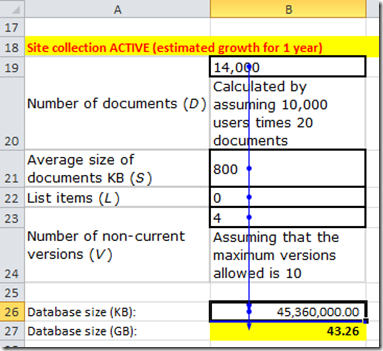
Cell B26 formula: =(B19*B21*B23)+(10*(B22+(B23*B19)))
You can always see the formula details for particular cell from Ribbon/Formulas tab/Formula Auditing group (Excel 2010)

Capacity Sheet
Use the screen shots below, Formula Auditing tools and Formulas in the Excel file to understand the logic of the calculations.
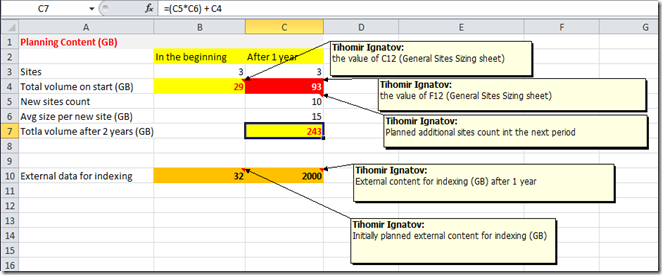


Capacity management and sizing for SharePoint Server 2010
http://technet.microsoft.com/en-us/library/cc261700(office.14).aspx
Storage and SQL Server capacity planning and configuration (SharePoint Server 2010)
http://technet.microsoft.com/en-us/library/cc298801(office.14).aspx
Actually the second article was my starting point for this blog post. The question was – how to size the storage for Sharepoint Server 2010 HA environment? I created an Excel sheet which implemented all rules and advises, mentioned in the resources above. You could download and use it for your projects and of course feel free to customize it. I’ll be very thankful if someone decide to contribute and extend the existing content!
Open it directly from SkyDrive: Sharepoint 2010 capacity planning and sizing sheet
Tool Reference
The idea behind this tool is that for each Sharepoint Server 2010 deployment stays a particular business need. Almost always we have a content, which has to be uploaded after deployment and this is our initial data. This data always grows and our sizing and capacity planning approach has to cover this important factor.
General Sites Sizing Sheet

Enter in this section your initial files count and volume in GB

Decide how many initial sites you will have in the farm (one row for each) and divide your initial files between them – as count and as volume.

Define a growth model for each site collection for the next 1 year using the tables. The final size (colored cell) will be auto populated in the above table.
You could find a detailed description of the used formula in Technet
http://technet.microsoft.com/en-us/library/cc298801.aspx

Cell B26 formula: =(B19*B21*B23)+(10*(B22+(B23*B19)))
You can always see the formula details for particular cell from Ribbon/Formulas tab/Formula Auditing group (Excel 2010)

Capacity Sheet
Use the screen shots below, Formula Auditing tools and Formulas in the Excel file to understand the logic of the calculations.


Saturday, November 27, 2010
SUGBG and Telerik
Saturday, October 23, 2010
Troubleshooting User Profile Service
Wow, it it amazing troubleshooting experience. Did you get your User Profile Service (Sharepoint 2010) working without issues?
if (upsWorking)
{Console.WriteLine(“You are lucky man”);}

So, some useful resources, thanks to Stefan for share!
Probably the best guides are here (thanks to Spence)
Rational Guide to implementing SharePoint Server 2010 User Profile Synchronization
“Stuck on Starting”: Common Issues with SharePoint Server 2010 User Profile Synchronization
On third place I’ll put the Technet article
http://technet.microsoft.com/en-us/library/ee721049.aspx
Good luck with UPS!

Thursday, August 5, 2010
How to Use Metadata Navigation in Enterprise Wiki Site (Sharepoint 2010)
If you want to use Metadata navigation tree in Enterprise Wiki Site, you have to do the following:
- Activate Metadata Navigation and Filtering feature on site level

- Navigate to Library settings page of your “Pages” library and select Metadata navigation settings
- From “Configure Navigation Hierarchies” select “Wiki Categories” and click “Add” and “OK”

- Navigate to Pages library again
http://<Your Wiki Site Url>/Pages/Forms/AllItems.aspx

But when you click on any of the pages on the right panel, the navigation tree will disappear.
![clip_image001[5]](https://blogger.googleusercontent.com/img/b/R29vZ2xl/AVvXsEjo0ICIhAbH_wHFEH0K81UmuhXEfw6Nhr1I_WHJe3ns1cm6yudZzdsjghgj7-aUcnUiPqcjYbd1IQWyVxMvIeiQoXJ0aDT3ETBPT6XgmBYwoI7WVsp3zGfIIh4ZUniX82zYxPqFk2sEaFP8/s1600-h/clip_image001%5B5%5D%5B5%5D.jpg "clip_image001[5]")
You have to change the EnterpriseWiki.aspx page layout or better to create and deploy a new one (via Sharepoint Designer or wsp)
You have to include a reference to MetadataNavTree control and put it in some placeholder (PlaceHolderLeftActions) on the page layout aspx file.
- Put this markup in the beginning of the page
<%@ Register TagPrefix="wssuc" TagName="MetadataNavTree" src="~/_controltemplates/MetadataNavTree.ascx" %>
- Put this code in the end of page’s code, after the next </asp:Content> tag
<asp:Content id="Content1" runat="server" contentplaceholderid="PlaceHolderLeftActions">
<wssuc:MetadataNavTree id="mdnt" runat="server" />
</asp:Content>
The result is:


How to Fix Sharepoint 2010 DCOM 10016 Error on Windows Server 2008 R2
If you get DCOM error 10016 in your event error, it means, that you have to configure local activation permissions of IIS WAMREG admin Service for your farm account.
Open Component Services/Computers/My Computer/DCOM Config/IIS WAMREG admin Service , Properties –> Security tab

Ooops … all controls are inactive?!?! The picture was different in WS 2003 and 2008, but in 2008 R2….

Open “regedit” and search for
HKEY_CLASSES_ROOT\AppID\{61738644-F196-11D0-9953-00C04FD919C1}
Right click, “Permissions” and click “Advanced” button, open “Owner” tab

Select some of the listed names or browse for another user or group and finally click Apply

Now, you (or your group) can change the permissions for modification of the service


After “OK”, try to reopen the “Component Services” console and open the properties window of IIS WAMREG admin Service. now the picture is a little bit different

Tuesday, July 6, 2010
Telerik Components for Sharepoint 2010
In their ASP.NET AJAX Q2 Beta release, Telerik packaged RadEditor and RadGrid as standalone web parts for Sharepoint 2010.
“Need to use our AJAX controls in a custom Sharepoint 2007/2010 implementation? Not a problem at all. RadEditor, RadGrid and the rest of our ASP.NET AJAX components can also be plugged very easily into Sharepoint 2007/2010 visual/dynamic web parts, or placed directly into Sharepoint pages/user controls.”
Telerik Sharepoint 2010 Demo Site: http://sharepoint.telerik.com/Pages/default.aspx
You can play with RadGrid web part after login with:
User: .\sp2010visitor
Pass: sp2010visitor
Here http://sharepoint.telerik.com/silverlight/Pages/default.aspx you can find screen casts from Sahil Malik, how to use Telerik Silverlight controls in Sharepoint 2010, together with Sharepoint client object model. Enjoy!


Subscribe to:
Posts (Atom)