Saturday, January 23, 2010

Microsoft Days 2010

imageIt’s conferencing time, the biggest Microsoft event in Bulgaria is scheduled for 30-31 March 2010.  The registration is already opened, you can see all speakers, sponsors and exhibitors (the content is still in progress).


I shall have two presentations there:

Enterprise Content Management with SharePoint 2010 (Level: 200)
and
SharePoint 2010 for Developers (Level: 300)

Come and see also Magi’s SQL sessions! Magi achieved Microsoft Certified Master: SQL Server 2008 and I’m sure, it will be great content, emotion and fun!

fcb_msdays10

Thursday, January 21, 2010

SUGBG (Meeting 8): Sharepoint 2010 Overview

We did our eighth Sharepoint Group meeting on 20-th of January. Fifty professionals came to see the new features of Sharepoint 2010. We spoke about news for IT Pros, Developers and end users. I had only four slides and 1 hour demo! :)

Monday, January 4, 2010

MOSS 2007 List IDs


List ID


List type

100

Generic list

101

Document library

102

Survey

103

Links list

104

Announcements list

105

Contacts list

106

Events list

107

Tasks list

108

Discussion board

109

Picture library

110

Data sources

111

Site template gallery

112

User Information list

113

Web Part gallery

114

List template gallery

115

XML Form library

116

Master pages gallery

117

No-Code Workflows

118

Custom Workflow Process

119

Wiki Page library

120

Custom grid for a list

130

Data Connection library

140

Workflow History

150

Gantt Tasks list

200

Meeting Series list

201

Meeting Agenda list

202

Meeting Attendees list

204

Meeting Decisions list

207

Meeting Objectives list

210

Meeting text box

211

Meeting Things To Bring list

212

Meeting Workspace Pages list

300

Portal Sites list

301

Blog Posts list

302

Blog Comments list

303

Blog Categories list

1100

Issue tracking

1200

Administrator tasks list

2002

Personal document library

2003

Private document library

Wednesday, December 9, 2009

Session state is corrupted

If you got some error like that – the problem is in your TV, not in IIS, not in Sharepoint :-))

Exception message: The session state information is invalid and might be corrupted.

Stack trace:    at System.Web.SessionState.SessionStateItemCollection.Deserialize(BinaryReader reader)
   at System.Web.SessionState.SessionStateUtility.Deserialize(HttpContext context, Stream stream)
   at System.Web.SessionState.SqlSessionStateStore.DoGet(HttpContext context, String id, Boolean getExclusive, Boolean& locked, TimeSpan& lockAge, Object& lockId, SessionStateActions& actionFlags)
   at System.Web.SessionState.SqlSessionStateStore.GetItemExclusive(HttpContext context, String id, Boolean& locked, TimeSpan& lockAge, Object& lockId, SessionStateActions& actionFlags)
   at System.Web.SessionState.SessionStateModule.GetSessionStateItem()
   at System.Web.SessionState.SessionStateModule.BeginAcquireState(Object source, EventArgs e, AsyncCallback cb, Object extraData)
   at System.Web.HttpApplication.AsyncEventExecutionStep.System.Web.HttpApplication.IExecutionStep.Execute()
   at System.Web.HttpApplication.ExecuteStep(IExecutionStep step, Boolean& completedSynchronously)

image

This occurs when there is a null value used for a Session Key and later a string based session key is used.

- Code adds a Null session key - this works and there are no errors.

- At a later request, code adds a string session key.

You are doing one of the following:

Object var = SomeFunction();

Session[var] = AnotherObject;

Or

Session[SomeFunction()] = AnotherObject;

You need to the return value and ensure it is not null!

Wednesday, December 2, 2009

Edit Document from MOSS 2007 with Office 2003

I had a case with customer (who uses Office 2003 ~4000 PCs and approximately 150 computers with Office 2007) where if the users try to open office document from MOSS 2007 with Office 2003, the file is always opened as read only. Our custom application needs to open the doc for edit and check it out. So, the result were – it is not supported by Office 2003.

What is supported and what not, is described here

Finally, after customization of CORE.JS we succeeded to run Office 2003 to work as 2007 and these steps are described below :)

In the beginning I need to say, that this blog post were very important, regarding the chosen technical approach

1. I created empty file in the following path: C:\Program Files\Common Files\Microsoft Shared\Web Server Extensions\12\TEMPLATE\LAYOUTS\1033\Checkout.JS

2. I got the code of DispDocItemEx function from CORE.JS file (in the same folder) and paste it inside the new one

3. In Checkout.JS I modified the code:

Original:

================

else

    {

    fRet=stsOpen.ViewDocument2(window, szHref, szAppId);

    }

================

Modified:

================

    else

    {

    if (ctx.isForceCheckout==true)

    {

    fCheckoutForEdit=confirm(L_ConfirmCheckout_Text);

        if (fCheckoutForEdit==true)

        {

        CheckoutDocument(ctx.HttpRoot, szHref, null);

            fRet=stsOpen.EditDocument2(window, szHref, szAppId);

            }

       else

       fRet=stsOpen.ViewDocument2(window, szHref, szAppId);

    }

    else

    fRet=stsOpen.ViewDocument2(window, szHref, szAppId);

    }

==================

4. I created a copy of C:\Program Files\Common Files\Microsoft Shared\Web Server Extensions\12\TEMPLATE\GLOBAL\default.master with name custom.master

5. Added the following code just after the red line

<SharePoint:ScriptLink language="javascript" name="core.js" Defer="true" runat="server" />

<!-- Checkout JS customization BEGIN -->

<SharePoint:ScriptLink language="javascript" name="Checkout.js" Defer="true" runat="server" />

<!-- Checkout JS customization END –>

6. I uploaded custom.master into http://myportal/sites/mysitecollection/_catalogs/masterpage, published and approved the new file.

7. The next step were to configure the site to use customized master page
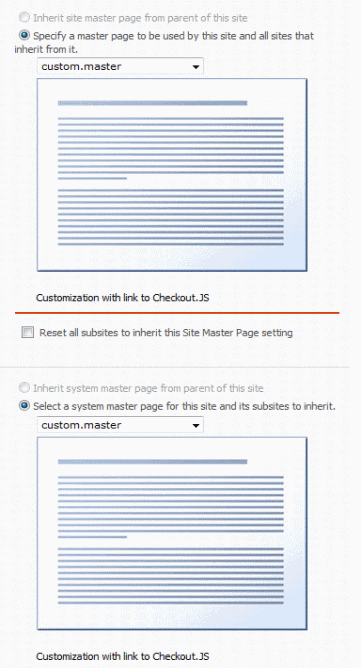
clip_image002

8. During the tests I found, that if I click on the file link (in document library page /AllItems.aspx) Office 2003 has the same behavior as Office 2007.

clip_image002

clip_image002[7]

The file is checked out, “Shared workspace” pane is opened and on document close the following windows appear

clip_image002[9]

But, here I want to make a note, that if you try to open a document in any other fashion (such hyper link in email or web page), the CheckIn-CheckOut menu items and/or TaskPane functionality may not be available or work as expected. This modification only affects the behavior of the document library page.

Saturday, November 14, 2009

Developing with Office 2010 Services

Visio Services:

Get Microsoft Silverlight

Access Services:

Get Microsoft Silverlight

Excel Services:

Get Microsoft Silverlight

Word services:

Get Microsoft Silverlight

Sharepoint 2010 Developer Resources

SP2010

The first place, which you need to visit before starting Sharepoint 2010 development is here. Clicking on the modules from the right side bar you will have an access to related HOL (see below) and code snippets from Paul Andrew’s blog 

What’s new in Sharepoint development  with VS 2010 (Beta 2)

What’s new in Sharepoint Foundation 2010 

What’s new in Sharepoint Server 2010

Sharepoint 2010 Developer Hands-on-labs (download): Series of 10 HOL, which covers:

  • Web parts development
  • List definitions and Event receivers
  • Using LINQ for Sharepoint
  • Using Client OM and REST
  • Business Connectivity Services (BCS) External Content Type
  • Sharepoint 2010 workflow
  • Developing UI and Silverlight
  • Sandboxed solutions
  • UI Ribbon and dialogs development

Sandboxed solutions - Sandboxed solutions run in a secure and monitored process that has limited resource access

Extending Sharepoint tools in Visual Studio 2010 - You can create extensions for projects, project items, define your own project item types and create deployment extensions.

Feature and Package designer

Visual Studio 2010 and Sharepoint 2010 (drill down and navigate through the content categories)

Peter Jausovec’s blog (http://blogs.msdn.com/vssharepointtoolsblog/)

Monday, November 9, 2009

SUGBG (Meeting 7): No-code solutions with Sharepoint 2007

When: 11 November 2009, 18:30

Where: Microsoft Bulgaria office (Sofia, Blvd.”Nikola Vaptzarov”, 55)

Session 1: Enhance Sharepoint with no-code solutions

Speakers: Esad Ismailov, Miloslav Shulev and Veselina Evstatieva (BNP Paribas)

Download the presentation

Session 2: Enabling SharePoint business users: iTechnology Forms Accelerator and K2

Speaker: Petya Gaitanska (iTechnology)

iTechnology presented their fantastic product iTFA. They demonstrated the Silverlight form designer, the rules editor, integration with K2 workflow and answered all questions from SUGBG members. The very important notice here is: iTFA is free! Download and test from here (needs registration).

For more info (in Bulgarian) visit www.sugbg.org